

Keyword research is a crucial aspect of digital marketing that involves identifying and analysing the keywords and search phrases that people use to find information, products, or services related to your business. It is essential for any business looking to improve its online visibility, attract more organic traffic, and increase its conversion rates.
Trying to get your business to rank on Google Search or Maps without doing any keyword research is like trying to build a house without tools. You have to know what your audience is searching for so you can create matching content on your website and Google Business Profile that shows up in search results and fits what they’re looking for. The way to do that is by doing keyword research.
What does Keyword Research help with:
Understanding Customer Behaviour
Keyword research helps businesses understand their customers’ needs, preferences, and interests. By analysing the keywords that people use to search for products or services, businesses can gain insights into what their customers are looking for and tailor their marketing strategies accordingly.
Improving Search Engine Optimisation (SEO)
Keyword research is critical for SEO as it helps businesses identify the keywords and phrases that they need to target to rank higher in search engine results pages (SERPs). By optimising their website content and other digital assets for these keywords, businesses can improve their visibility and attract more organic traffic to their website.
Enhancing Content Marketing
Keyword research is also crucial for content marketing. By identifying the keywords that people use to search for information related to your business, you can create content that addresses their queries and provides them with valuable information. This can help to establish your brand as a thought leader in your industry and drive more traffic to your website.
Increasing Conversion Rates
By targeting the right keywords, businesses can attract highly relevant traffic to their website, which is more likely to convert into paying customers. By understanding their customers’ search behaviour and intent, businesses can create targeted campaigns that are more likely to drive conversions.
How to perform Keyword Research (for Free)
Step 1: Google Business Profile
Your Google Business profile is an powerful tool that is often ignored by most business owners. It’s right there in your Google business profile.
Log into the Google account linked with your business profile and head over to the search interface. You will see a performance icon. Click on it. A pop up window will appear, which, by default, will show you how your listing has been performing over the past six months.
Scroll down until you see the Searches Breakdown section.This section breaks down all the keywords your listing is ranking for and how often it pops up in search results.
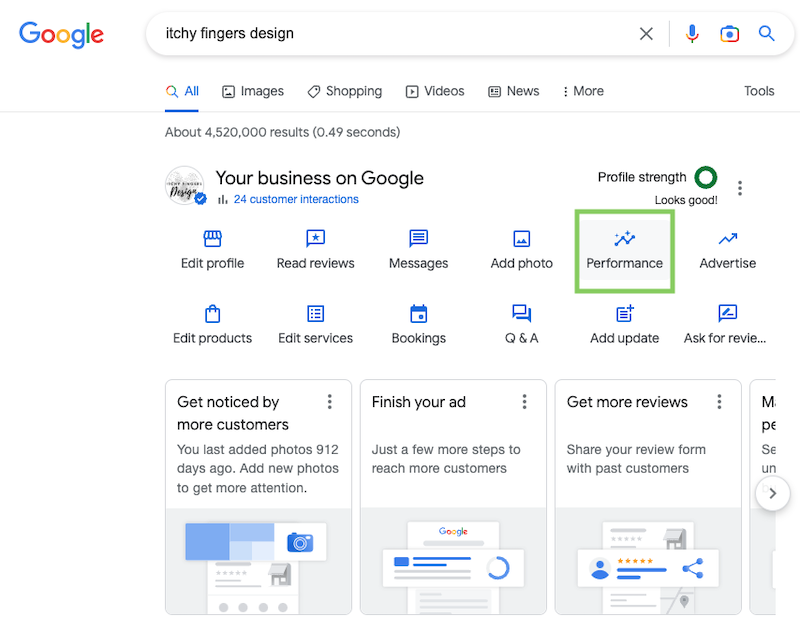
Start to dig through the list to view potential opportunities for your business.
Scroll down to the bottom to see the search results and click on ‘See More’ to view the entire list. This will show you all the keywords you are ranking for and how many times it appears in search results.
Now it’s time to dig through the list and find some potential keyword opportunities that you can use for your website or your Google Business Profile.
Let me give you an example. One of my clients is an electrician and I noticed that people are searching for ‘electrician same day services’, but he doesn’t have that service listed on his website, so it would probably be a good idea to create a page for it.
You can also use these keywords to create more content for your Google Business Profile, like Posts and FAQs. Although it won’t boost your listings rankings, it will definitely match what the visitors are searching for (this is called ‘search intent’), and they’ll be happy to see that you’re providing exactly what they need.
Unfortunately, Google doesn’t give you the option to download the full list of keywords. But when there’s a will, there’s a way.
Install a chrome extension called ‘Table Capture’ which lets you easily add keywords to a list with a click.
Once installed, head over to your keyword breakdown list and highlight one of the keywords from the list. Then right click from the drop down menu, select the ‘Table Capture’ option. This will trigger a popup and highlight the keyword you’ve selected. From the popup, click on select parent element. This will select the entire table where all the keywords are included.
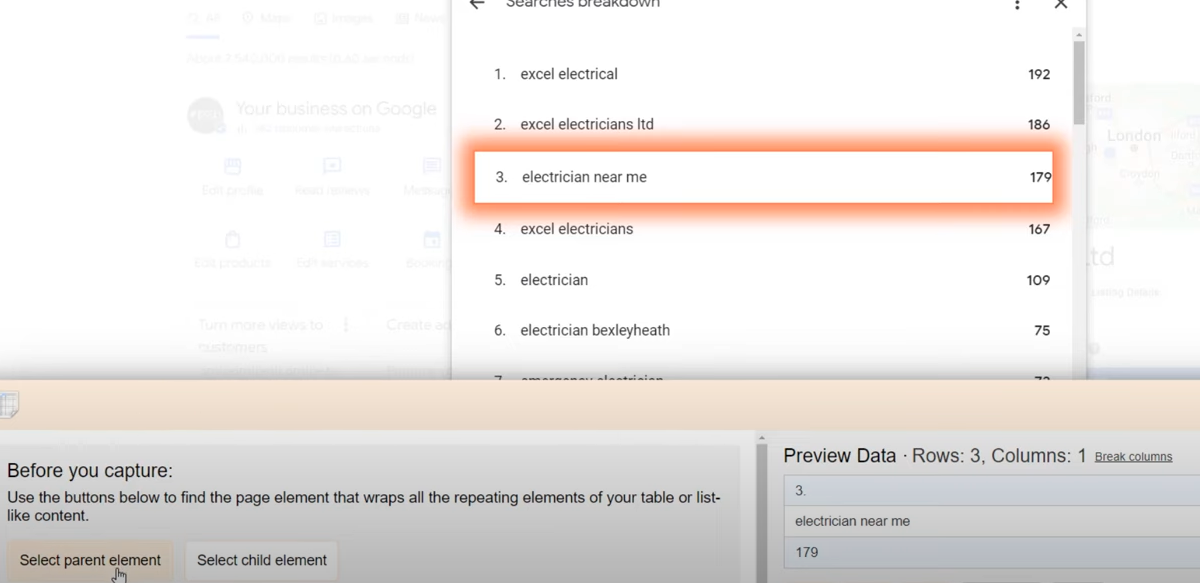
In just one click, you can export it to a Google sheet, just click OK when you see the prompt, then right click in a document and paste.
Let’s stick with your Google My Business listing for now, but this time click on the ‘Edit Service’ icon. Not everyone will have this option available, but for those of you who do, a window will open up displaying the services you offer.
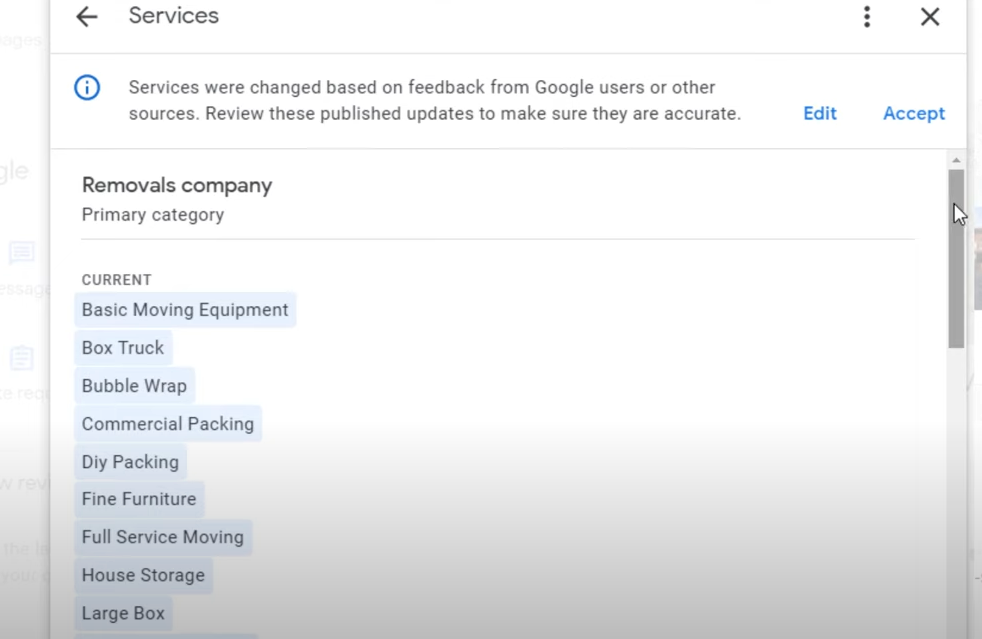
If you haven’t checked your listing in a while, you might notice a super long list of services that you didn’t add yourself and wonder where they came from. Google can actually automatically populate this section based on other information they found on the web, like your website.
While some of these services may not be relevant to you, since Google doesn’t always get it right, you can use the others as inspiration to create more content on your website that you didn’t think about before. You can tidy up the list by clicking on ‘Edit’ and reviewing all the services that have been added to your profile. Just untick the ones you don’t want.
Here is a pro tip: For certain industries, Google would suggest some predefined services based on your business category. Find out if this is the case for you by clicking on the ‘Add More Services ‘ option. Add the ones you feel are relevant to your business and create matching content pages on your website.
Let’s take this to the next level and peek at your competitors list of services to discover even more keyword ideas.
To do this, download an extension called ‘GMB Everywhere‘. Once it’s downloaded, head over to Google Maps and search for a keyword related to your industry like ‘Kitchen Designers’, for example. Google will overlay some options on each listing, including one called ‘Basic Audit’.
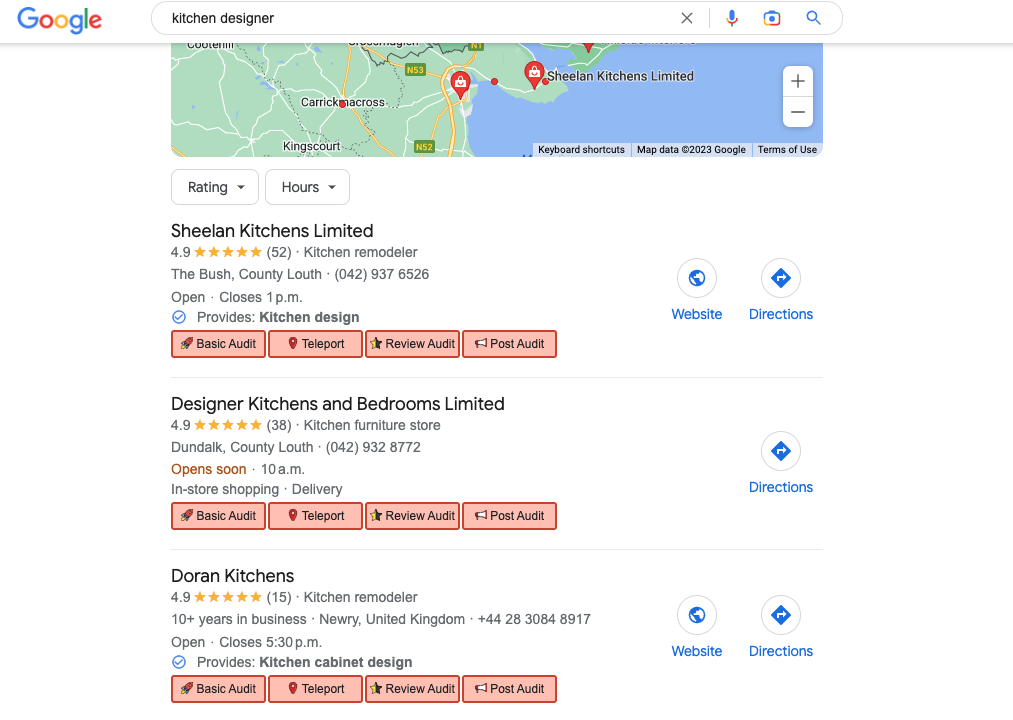
Click on the ‘Basic Audit’ button to run a basic audit for one of the listings. This will bring up the full details of the listing.
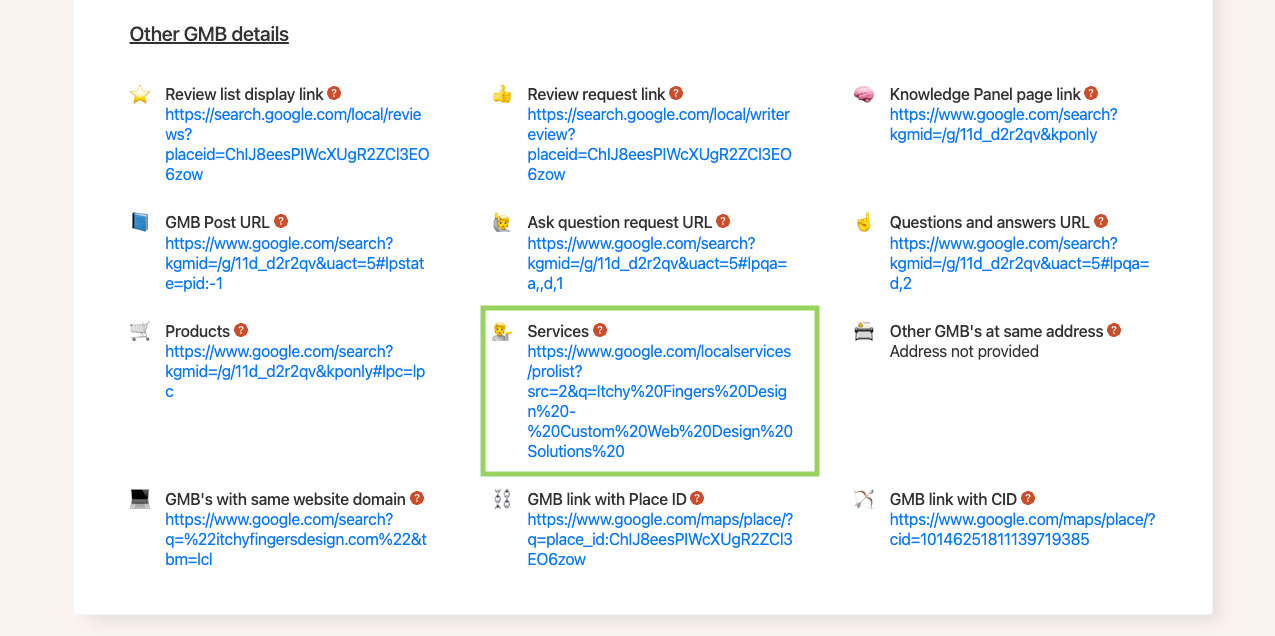
Under the ‘GMB Details’ section, you’ll see a link called ‘Services’. Just click on it.
On the next screen, click on the listing itself and then on the ‘Service’ tab.
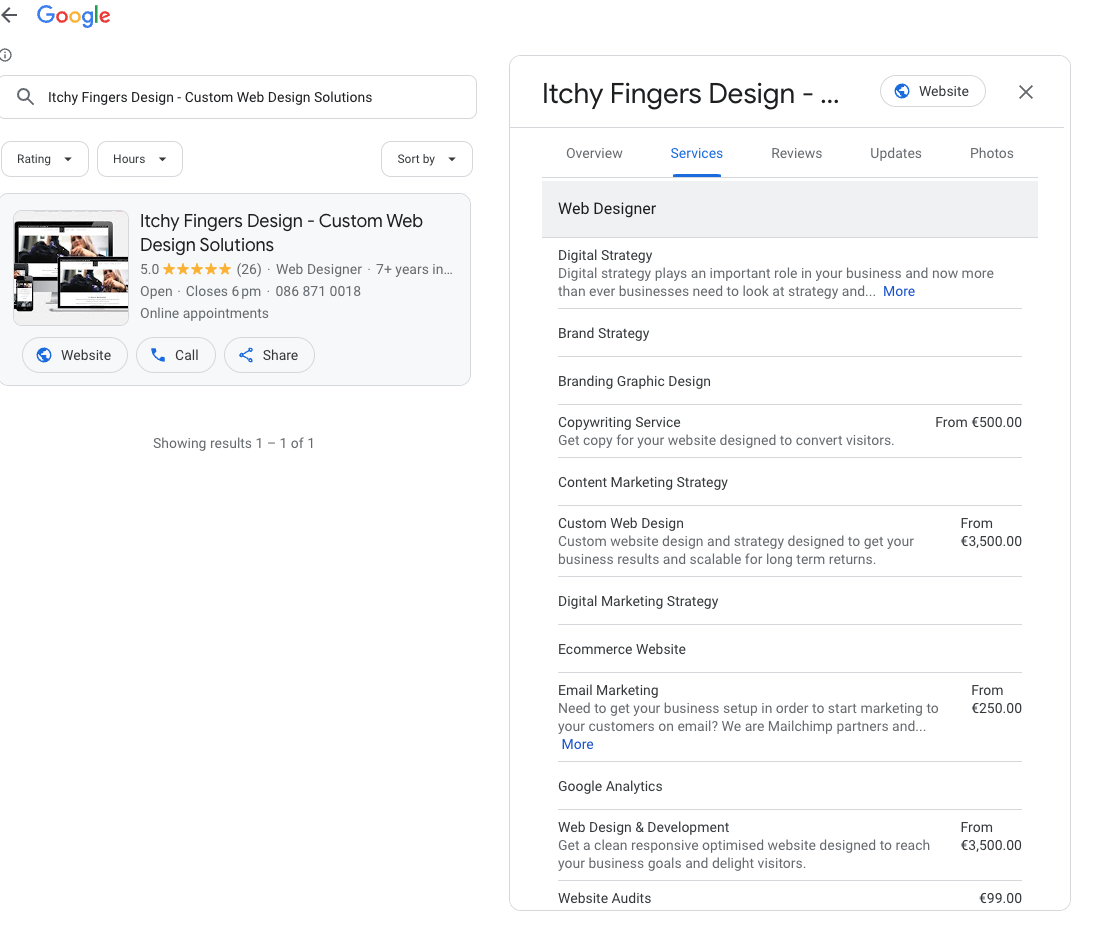
This will show you all the services your competitor is associated with, and some of them may apply to you too. To download the full list, use the Table Capture extension and add this list to the keyword list from your Google Business profile.
See how your keyword list is nicely building up.
Step 2: Google Keyword Planner
Use a tool like Google’s Keyword Planner to get ideas for related keywords and their search volumes.
Google Keyword Planner is a valuable tool for conducting keyword research, especially if your Google Business profile is new and not showing many of the keywords your listing is ranking for. Although the tool is free, you will need to create a Google Ads account which requires you to provide credit card details. However, you won’t be charged any money once you’ve created an account.
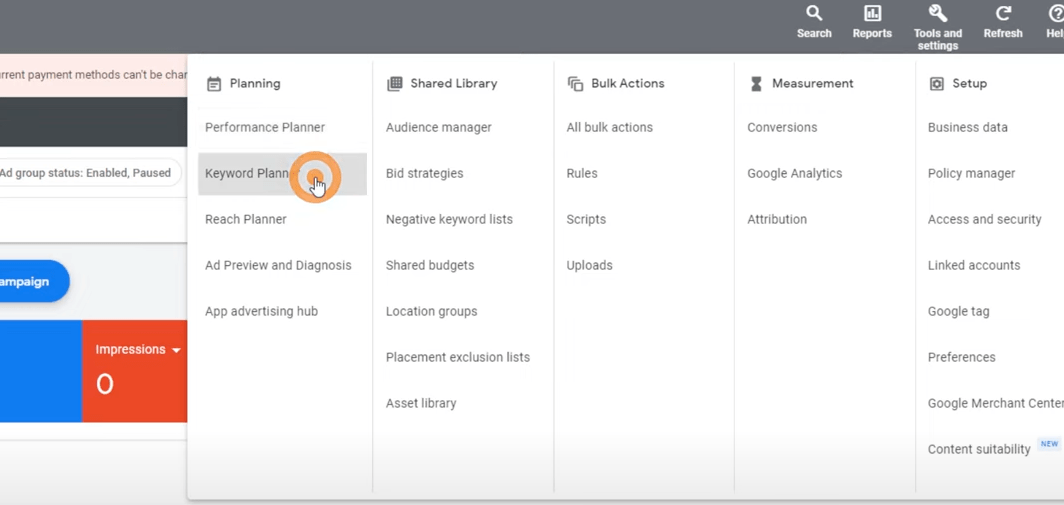
Click on the ‘Tools and Settings’ option in the top navigation bar. From there, select ‘Keyword Planner’ to open up the tool, choose ‘Discover New Keywords’, and enter up to ten products or services related to your business in the search box.
Since you’re a small business, you’ll want to narrow down your search to find out what people are searching for in your area. Let’s say your business operates in Dublin, Ireland. Under the ‘Keyword Input’ box, click on ‘Location’ and enter ‘Dublin’ in the search box. That way you’ll only see results for Dublin, and Google will even give you the estimated population of the area.
Once you’ve added your location, click on ‘Save’ and then ‘get results’. Google will show you the ‘average monthly searches’ for the keywords you’ve provided, plus the level of competition and more. But Google will also suggest further keyword ideas based on your initial selection. Download the full list and review it carefully.
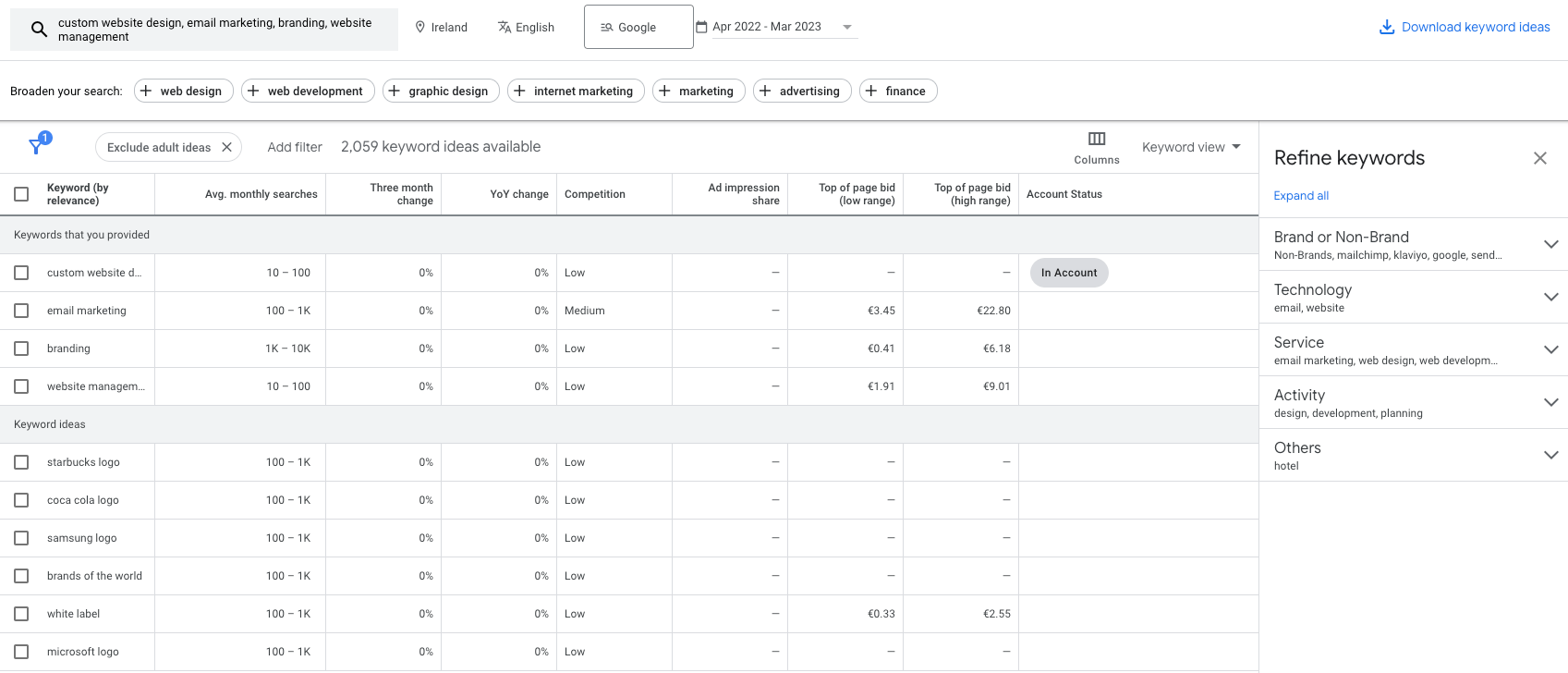
Go after the ones with the higher search volume and the lowest competition. But use some common sense too. For example, if you’re an electrician ‘electrician near me’ might be a highly competitive keyword, but it’s still an important one to target it.
Step 3: Google Search Console
The next tool we’re going to look at is, in my opinion, one of the best SEO tools out there. For some reason, a lot of business owners don’t realise just how valuable it is – and it’s totally free. I’m talking about Google Search Console.
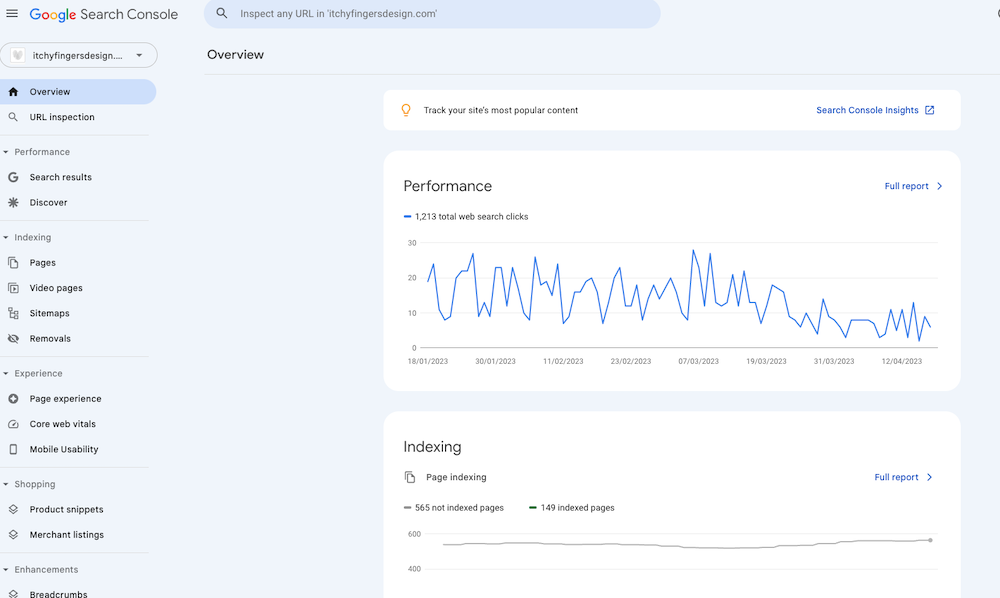
With this tool, you can
- see how your site is performing in search results
- spot any issues with specific pages
- check out which links are pointing to your site … and much more
And when it comes to doing some great keyword research, it’s an absolute powerhouse. You’ll need to install it on your website first, so if you haven’t installed it yet, do it as soon as possible. If I have built your website, it would have been added then.
For those of you who have it installed, here is how you can do some quick keyword research.
From the left hand side menu, click on ‘Search Results’. You’ll see a bunch of data, like the number of times users clicked through to your site from Google search results, how many times a user saw a link to your site in Search Results, also known as ‘impressions’ your site’s ‘average Click Through Rate’ and your ‘average position in Search results’.
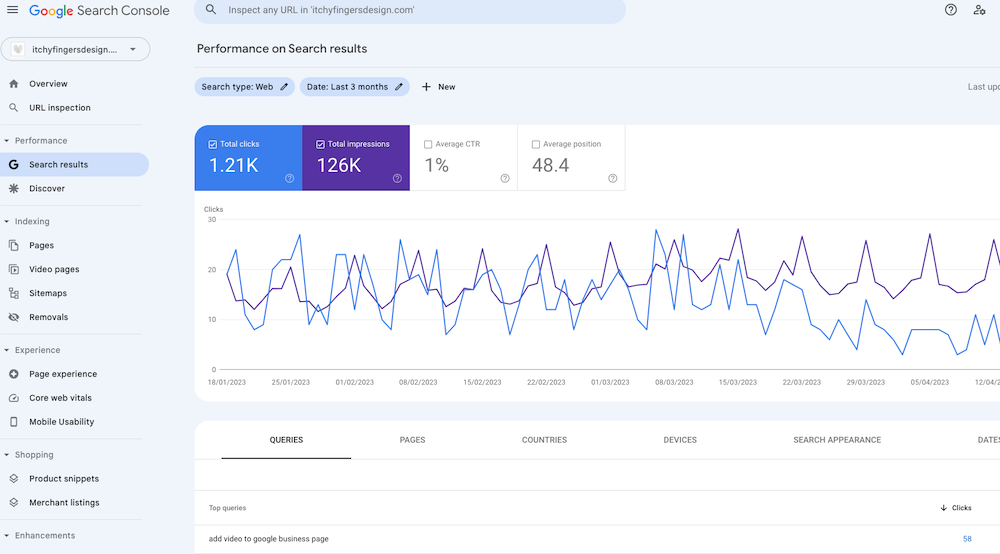
Scroll down a bit and you’ll see even more detailed info broken down by queries, which are just the keywords your site is ranking for pages, countries, etc. Make sure the ‘Query’ tab is selected, then click on both the ‘average clickthrough rate’ and ‘average position’ tab.
Choose a decent date range, like a year, and click on ‘Apply’ and click the ‘Export’ button. Just like that, you’ll have a list of keywords that people have searched for on Google and that your website has shown up for in the past year. The list defaults to the most popular keywords, the one driving the most clicks, but chance sare you’re already ranking high for those already. So to really make the most of this list, you need to filter it down.
The quickest way to find some valuable keywords is to sort the list by the number of impressions. If you’re using Google Sheet, highlight all the columns, then go to Data > Sort > Range > Advanced Range Sorting Options > and sort by ‘column C’,which is the ‘impression column’. Be sure to tick the box ‘Data has header row’.
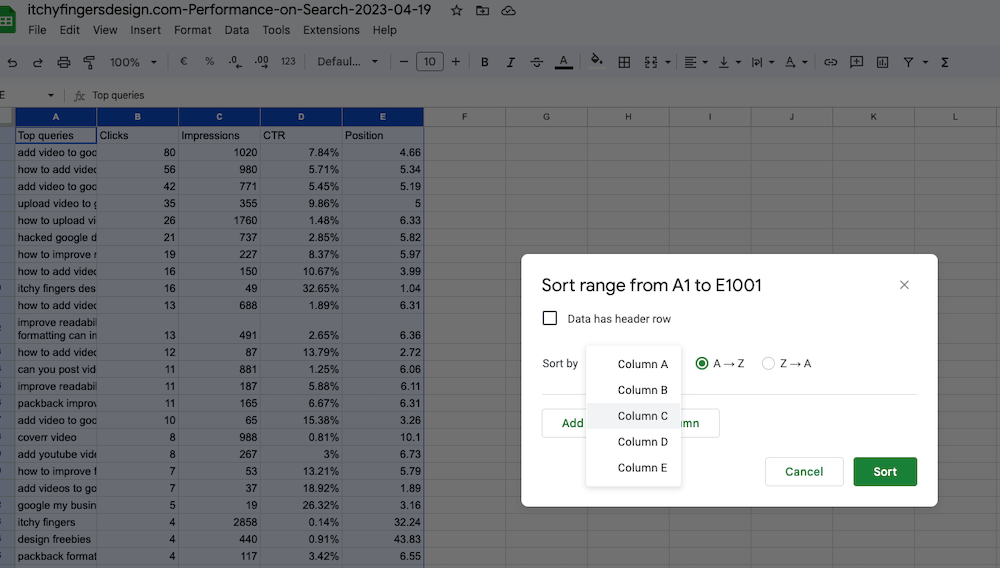
Then tick the ‘Z to A’ option.
This nifty little trick will help you spot keywords that are already doing well on your site because they generate a ton of impressions and a fair amount of clicks.
But if you optimise your content further for those keywords, you will rank higher and get even more traffic. Or you could discover totally new keywords that have a ton of impressions that you never even thought of before and you’re not even ranking for them.
That’s where you can create some new content on your site and attract even more visitors.
Step 4: Use Google Autocomplete
Another free and easy way to find keywords is to use Google Autocomplete. Simply type in a relevant keyword or phrase and see what suggestions come up.
These suggestions are based on actual searches that people have performed, so they can be a great source of inspiration for new keywords.

Step 5: Check out your competition
Take a look at your competitors’ websites and see what keywords they are targeting. In addition to the Google Business Audits detailed above, use a tool like SEMrush to analyse competitor websites and find out which keywords they are ranking for. This can give you ideas for new keywords to target or help you identify gaps in your own keyword strategy.
Step 6: Analyse your keyword list
Once you have a list of potential keywords, it’s important to analyse them to determine their search volume, competition, and relevance to your business. Use a tool like Google’s Keyword Planner or Ubersuggest to get this information. Look for keywords with high search volume, low competition, and high relevance to your business.
Step 7: Refine your keyword strategy
Based on your analysis, refine your keyword strategy by selecting the most relevant and high-performing keywords to target. Use these keywords to optimise your website content, meta tags, and other digital assets. Monitor your performance using tools like Google Analytics and adjust your strategy as needed.
When doing keyword research, I would collect all the results from the tools above into one Google Sheet using tabs. Having everything together makes refinement and analysis much simpler.

In conclusion, keyword research is a critical component of any successful digital marketing strategy. It helps businesses to understand their customers’ needs and preferences, improve their SEO, enhance their content marketing efforts, and increase their conversion rates. Using the tools and methods shared above should help you get a better idea of what your potential customers are searching for and what content to create that ranks well on Google.
If you would like some help with keyword research and strategy for your business, get in touch on email or book a 20 minute chat.